An OpenAI invoice has three moving lines, not two: fresh input, cached input, and every output token the model produced including the ones you never see. Reasoning tokens bill at the full output rate and are not returned in the response, which is why a first invoice routinely lands several times above what a plain token calculator predicted.

On the grid we read on 14 August 2026, gpt-5.2 charges $1.75 per million input tokens, $0.175 per million cached input tokens and $14.00 per million output tokens, so 12,000 hidden reasoning tokens cost $0.168 while the 800 token answer wrapped around them costs $0.011. The calculator below prices your own request shape across the OpenAI grid with a cache slider, a Batch API line and a field for the reasoning you cannot see, and the rest of this page explains where each of those numbers comes from and when it moves.

OpenAI cost calculator
Describe one request, not a monthly token total. Rates read from the OpenAI pricing page on 14 August 2026, per million tokens.
Cost breakdown
Same request shape, every model on the grid
Cached input applies only to the part of a prompt that repeats a prefix the API has already seen. Rows marked no cached rate bill every input token at the full rate. The Batch and priority factors are the published Batch API and priority processing multipliers on the gpt-5.2 line, applied across the grid.
What this calculator counts that the simple ones do not
The standard token calculator asks for input tokens, output tokens and a model, multiplies, and shows you a figure. That arithmetic was complete when models had one price column and returned everything they generated. It is not complete now, and the gap between it and your statement is made of three things.
Cached input is the first. Repeated prompt prefixes bill at a tenth of the input rate on every OpenAI row that publishes a cached rate, so a calculator that ignores caching overstates a heavily repetitive workload by a wide margin and understates nothing. Batch is the second: the same weights, the same output, half the price, in exchange for a 24 hour window. Reasoning tokens are the third and the only one that pushes the real number above the estimate rather than below it, which is exactly why it is the one that hurts.
Put those together and two teams running the same nominal token volume can be a factor of ten apart on the invoice. The calculator above lets you set all three, so the output is a number you can defend in a budget rather than a floor.
The OpenAI grid, read on 14 August 2026
Here are the rows the calculator uses. All figures are per million tokens, standard tier, as printed on the OpenAI pricing documentation on 14 August 2026.
| Model | Input | Cached input | Output |
|---|---|---|---|
| gpt-5.6-luna | $0.20 | $0.02 | $1.20 |
| gpt-5.4-mini | $0.75 | $0.075 | $4.50 |
| gpt-5.1 | $1.25 | $0.125 | $10.00 |
| gpt-5.2 | $1.75 | $0.175 | $14.00 |
| gpt-5.6-terra | $2.00 | $0.20 | $12.00 |
| gpt-5.4 | $2.50 | $0.25 | $15.00 |
| gpt-5.5 | $5.00 | $0.50 | $30.00 |
| gpt-5.6-sol | $4.00 | $0.40 | $20.00 |
| gpt-5.6-cyber | $12.50 | $1.25 | $75.00 |
| gpt-5.2-pro | $21.00 | no cached rate | $168.00 |
Where each row can be re-checked, as of 10 September 2026: the gpt-5.6 rows and gpt-6-astra came from OpenAI’s own pricing page. On 6 October 2026 that page lists gpt-6-astra, gpt-6.1-sol and gpt-6-luna, with gpt-5.6-sol and gpt-5.6-cyber in a separate table, while gpt-5.6-terra and gpt-5.6-luna are now priced only on their own model pages, at the rates shown here. The gpt-5.1, gpt-5.2, gpt-5.4 and gpt-5.5 rows are no longer on that page, but their meters are still published in Microsoft’s Azure retail price API, where we re-queried them the same day and found them unchanged.
The OpenAI grid, fresh and cached input

Two details in that table decide more budgets than the headline rates. gpt-5.6-terra costs more than gpt-5.2 on input and less on output, so which of the two is cheaper depends entirely on your input to output ratio rather than on which sounds more advanced. And gpt-5.2-pro has no cached input rate at all, so a workload built on a long stable system prompt loses its single largest discount the moment it moves up to that row. If you want the same numbers next to Anthropic, Google, DeepSeek and Mistral, our LLM API pricing comparison across every major model puts the whole market on one table.
Cached input, a tenth of the rate on a stable prefix
Prompt caching bills a repeated prefix at 10 percent of the input rate on every OpenAI row we read that publishes one. On gpt-5.2 that is $0.175 instead of $1.75. The discount is automatic in the sense that you do not opt in, and conditional in the sense that it only fires when a request opens with a run of tokens the API has already seen.
That condition is an architectural instruction disguised as a pricing footnote. Put the system prompt, the tool definitions and the retrieved corpus first, and the variable part last, and a large share of your input tokens land in the cheap column. Interleave the user question through the middle of the prompt, or rotate a timestamp into the header, and the prefix breaks at the first variable token: everything after it bills at full rate. Teams that get nothing from caching have usually not turned it off, they have written a prompt that cannot be cached.
The cache slider in the calculator is the honest way to model this. Set it from what your usage dashboard actually reports rather than from what your architecture diagram promises. One line the calculator leaves out: the 5.6 rows in the screenshot above also print a cache writes column, $5.00 per million on sol, $2.50 on terra and $0.25 on luna, each one above that row’s own input rate. On a prefix written once and read thousands of times that premium vanishes into the rounding. On a prompt whose cache keeps being rebuilt it does not. Anthropic charges a write premium for the same mechanism and prints it on every row, and we worked that arithmetic through in Claude API pricing with the cache columns included.
The Batch API halves the bill on work nobody is waiting for
The Batch API charges half the standard rate on input, cached input and output, and returns results within a 24 hour window instead of immediately. Priority processing runs the other way and doubles everything for lower and more predictable latency. Between the cheapest and the most expensive line for the same weights there is a factor of four.
Most teams pay the standard rate for work that would have been perfectly happy overnight. Classification backfills, bulk labeling, nightly summaries of yesterday’s tickets, evaluation runs and embeddings regeneration are all batch work, and moving them halves that line item with no model change and no quality change. The reverse error is rarer and more expensive: buying priority for a background job where no human is waiting on the response.
This is also why third-party price trackers disagree with each other. A tracker that reports the cheapest number it can find quotes the Batch line, which is not a price cut on the standard tier. Before you build a budget on a figure you found somewhere, check which of the three columns it came from.
Reasoning tokens, the output line you never see
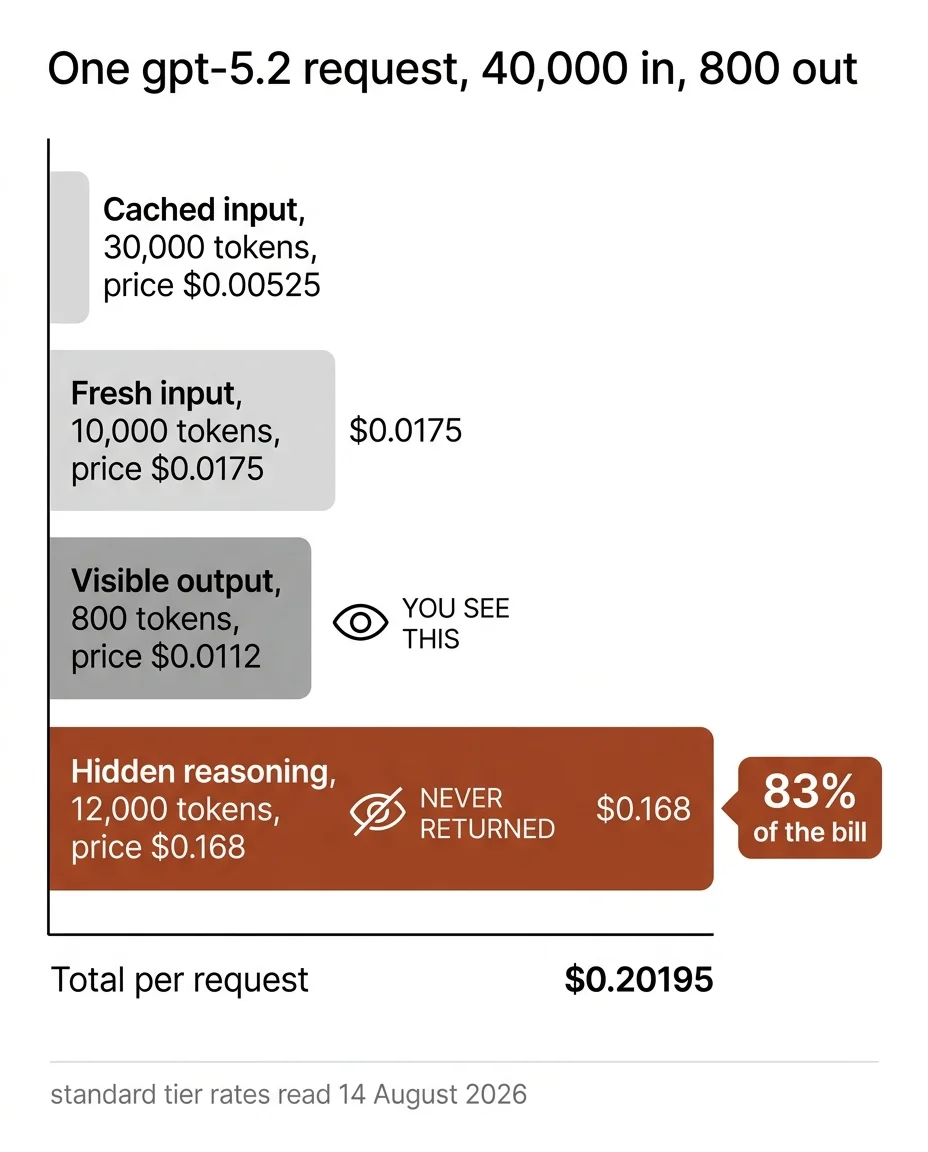
Reasoning models generate tokens before they answer. Those tokens are billed at the output rate, they are counted in your usage, and they are not in the response body your application receives. So the natural way to estimate cost, counting the characters your code got back, misses them completely.
The size of the gap is not a fixed constant, which is the uncomfortable part. It varies with the model, with the reasoning effort setting, and with how hard the individual task is: a lookup and a multi-constraint planning problem sent to the same model on the same settings will not think for the same number of tokens. That means you cannot derive it from a published number. You have to read it from your own usage reporting, where reasoning tokens appear as their own count, and then put that number into the field in the calculator.
Once you have it, the arithmetic gets brutal quickly. At 12,000 reasoning tokens against 800 visible ones, 94 percent of your output tokens are invisible, and on gpt-5.2 that is $0.168 of a $0.179 output cost. This is also the strongest argument for pricing per task rather than per million tokens, which we worked through on the model itself in our breakdown of what the gpt-5.2 tier actually buys you.
One agent run, priced three ways
Take a realistic agent request on gpt-5.2: 40,000 input tokens with 75 percent of them served from cache, 800 tokens of visible answer, 12,000 tokens of reasoning, run 30,000 times a month.
The naive estimate treats the input as fresh and counts only the visible answer: 40,000 input tokens at $1.75 per million is $0.07, plus 800 output tokens at $14.00 per million is $0.0112, so $0.0812 per run and $2,436 a month. That is the number most calculators return.
The real bill on the same request counts the cache and the reasoning. Fresh input drops to 10,000 tokens at $0.0175, cached input is 30,000 tokens at $0.00525, visible output stays at $0.0112, and the hidden reasoning adds $0.168. Total: $0.20195 per run, $6,058.50 a month. The invisible line alone is $5,040 of it, 83 percent of the bill.
Move the same workload to the Batch API and every one of those numbers halves: $0.101 per run, $3,029.25 a month. Turn caching off instead and the month goes to $7,476, which puts the value of a stable prefix at $1,417.50. Three answers, one request shape, and the spread between the naive estimate and the worst real case is more than three to one.
What the calculator cannot know
The output is arithmetic on published rates and the token counts you enter, so it inherits every assumption in those inputs. It does not know your completion rate, and a cheap tier that hands back one task in five half finished costs you the cheap call plus the expensive retry plus the person who read both. It does not price tool calls, function results or retrieved documents beyond the tokens they add to your prompt. It does not apply the long context surcharge that the 5.6 rows charge past 272K, nor the cache writes those rows bill separately, so an occasional oversized request and a cache that keeps being rebuilt are both priced too low here. It does not know about committed use or enterprise discounts, which are negotiated and unpublished. And it prices text only.
Use it to size a decision, not to forecast a statement to the dollar. The decision it is good at is the one between two rows of the grid at your actual request shape, because that comparison holds even when the absolute figures drift.
How we checked these prices, and what we did not check
Every rate in the table and in the calculator was read from the OpenAI pricing documentation on 14 August 2026. The screenshot above archives the three 5.6 rows of that read, with their long context and cache writes columns; the other seven rows come from the same grid on the same day and are not in that capture. The Batch and priority multipliers are the published Batch API and priority processing factors on the gpt-5.2 line; the calculator applies them across the grid, which matches how OpenAI documents them but which we verified on that one row rather than on all ten. Where the grid printed no value, such as the cached input rate for gpt-5.2-pro, we say so rather than substitute a number.
What we did not check: rate limits per usage tier, which move independently of price; enterprise and committed use pricing, which is not published; ChatGPT subscription pricing, which is a different product on a different meter and appears nowhere on this page; and image, audio or embedding rates, which are outside the scope of this calculator. The per-run figures in the worked example are arithmetic on the published rates using the token counts stated there, not measurements of your workload. Vendor pricing changes without notice, so read 14 August 2026 as the expiry stamp on all of it.
Frequently asked questions
How much does the OpenAI API cost per 1,000 tokens?
Divide any figure in the table by a thousand. On gpt-5.2 that is $0.00175 per thousand input tokens and $0.014 per thousand output tokens, read on 14 August 2026. The per thousand framing is misleading on reasoning models though, because it invites you to count the tokens in the response and stop, and the response is not where most of the output tokens are.
Why is my OpenAI bill higher than my token count says it should be?
Three usual causes, in order of frequency. Reasoning tokens billed as output that never appeared in a response. Caching that is not firing because the prompt has a variable element near the front. And retries, whether your own error handling or a framework retrying quietly on your behalf, each of which is a full priced request.
Can you turn reasoning tokens off?
You can lower the reasoning effort setting where a model exposes one, which reduces the count rather than removing it, and you can route the work to a model that does not reason before answering. Neither is free: the whole reason the expensive tier finishes multi-step tasks is the thinking you would be switching off. Price the retries before you optimize the reasoning away.
What is the cheapest OpenAI model to run at volume?
On the grid we read, gpt-5.6-luna at $0.20 input and $1.20 output is the cheapest row, roughly an eighth of gpt-5.2 on input and a twelfth on output. It is no longer the cheapest OpenAI model: gpt-6-luna, released after our reading, costs $0.10 input and $0.50 output, and gpt-5-nano is lower still at $0.05 and $0.40 but is marked deprecated, both re-read on 6 October 2026. gpt-5.6-luna is the right answer for routing, extraction against a fixed schema and closed-set classification. It stops being the right answer where a task needs several constraints held at once, and the test is to run 200 of your own tasks on it, count the ones needing correction, and price those corrections at the expensive rate.