On Gemini 4, one PDF page costs about 280, 560 or 1,120 input tokens depending on the resolution you ask for, so a page at the default medium resolution costs $0.00084 on Gemini 4 Hydrogen, $0.00168 on Gemini 4 Neon and $0.00112 on Gemini 4 Carbon until 30 November. Since 23 November 2026, file slicing lets you send only the pages you need, and Google bills only those. On a 300-page report, a low-resolution skim on Hydrogen followed by a high-resolution look at three pages on Neon cuts the input bill from $0.504 to about $0.136.

What one PDF page costs on each Gemini 4 model
Gemini does not bill a PDF by the file or by the megabyte. It renders each page to an image and counts that image in tokens, then charges those tokens at the model’s normal input price, the same rate as text.
Tokens per page at low, medium and high
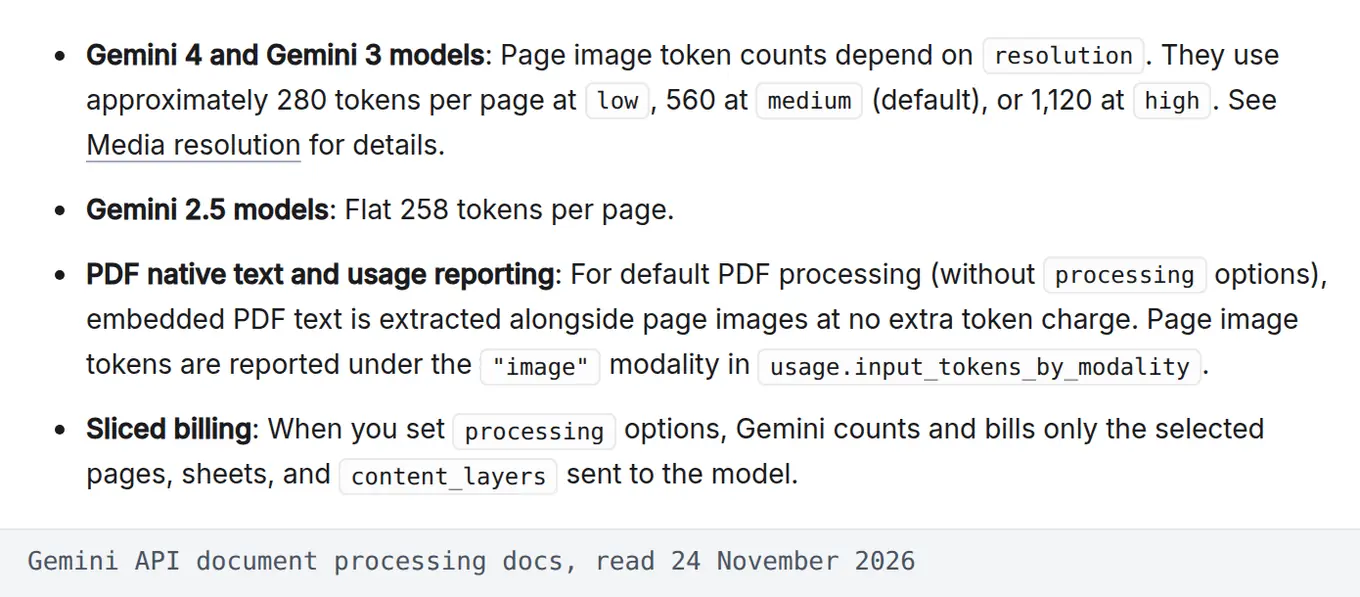
Google’s document processing guide gives one number per resolution for Gemini 4 and Gemini 3 models. Pages are rendered to 2-megapixel images at 288 DPI, and the pixel size of your original file does not change the count.
| Resolution setting | Tokens per page |
|---|---|
| low | about 280 |
| medium (default) | about 560 |
| high | about 1,120 |
| Gemini 2.5 models, any page | flat 258 |
That last row is the 258 figure still quoted in most forum threads. It only describes Gemini 2.5: on Gemini 4, the default page costs more than twice as much.
The price of 1,000 pages
Multiply those token counts by the Standard input rates on Google’s Gemini API pricing page, read on 24 November 2026, and you get the input cost of 1,000 pages at low, medium and high resolution:
| Model and input rate per 1M tokens | 1,000 pages at low / medium / high |
|---|---|
| Gemini 4 Hydrogen, $1.50 | $0.42 / $0.84 / $1.68 |
| Gemini 4 Hydrogen on Batch, $0.75 | $0.21 / $0.42 / $0.84 |
| Gemini 4 Carbon or Argon, $2.00 until 30 November | $0.56 / $1.12 / $2.24 |
| Gemini 4 Carbon or Argon, $4.00 from 1 December | $1.12 / $2.24 / $4.48 |
| Gemini 4 Neon, $3.00 | $0.84 / $1.68 / $3.36 |
These are input costs only. The answer is billed on top at the output rate, thinking tokens included: $7.50 per million on Hydrogen, $15.00 on Neon, $10.00 on Carbon until 30 November.
Carbon and Argon double on 1 December
Carbon and Argon still carry their introductory rates. The pricing page says $2.00 input “through November 30, 2026” and $4.00 “starting December 1, 2026”, so any document budget built on Carbon this week is worth half what it will cost next week.
From 1 December 2026, a medium-resolution page on Gemini 4 Carbon costs $0.00224, more than Neon's $0.00168.
My full breakdowns of Gemini 4 Hydrogen’s rate card and the Gemini 4 Neon grid cover caching, Batch and Flex for each model.
What file slicing changes on the bill
Google announced file slicing controls on 23 November 2026, for all Gemini 4 models in Google AI Studio and on the Gemini platform. The rule that matters for cost sits in the documentation: when you set processing options, Gemini counts and bills only the selected pages, sheets and content layers sent to the model.
Before 23 November, the whole file every time
Without slicing, a 300-page PDF attached to a request is 300 pages of tokens, even if the answer lives on page 3. Agents worked around that by running PDF renderers, LibreOffice and ffmpeg locally to cut files before sending them.
Google’s own announcement post shows the change in a short demo:
New in the Gemini API: Native file slicing controls 📄✂️ Pass dense PDFs, Office & OpenDocument files, audio, and video directly to Gemini 4 models, and slice just the pages, cells, or timestamps you need server-side.
@googledevs
https://x.com/googledevs/status/2124936137739542604
What you can slice, and what is billed
Each file type has its own controls, all passed in a processing block next to the file URI:
- PDF, Office and OpenDocument files: a page range (start_page, end_page), a resolution (low, medium or high) and the layers to send, page_image, page_text or both.
- Spreadsheets: one tab (sheet_index), a cell range (visible_cells) and the layers data, formulas and visuals.
- Video: a time window (start_offset, end_offset), frame rate, resolution and the layers transcript, frames or audio.
- Audio: a time window only.
The same slices work inside a function response, so a tool or subagent can hand Gemini only the pages it found. Philipp Schmid shows Gemini 4 Neon reading media chunks returned by tools:
Gemini 4 Neon can now natively read video and audio chunks from tools or subagents! Today we are rolling out document, audio, video function results in the Gemini API. 🚀
@_philschmid
https://x.com/_philschmid/status/2124929125974450503
Limits that still apply to the whole file
Slicing changes what is billed, not what you can upload. Google applies its caps to the full file, even when you only request one page:
- 50 MB per file.
- 1,000 pages per PDF, 2,000 pages or slides per Office or OpenDocument file.
- 50,000 cells per spreadsheet tab.
Slicing also becomes the only way to read a maximum-size PDF in one go on Hydrogen. At high resolution, 1,000 pages come to about 1,120,000 tokens, more than its 1M-token context window.
Skim cheap, then zoom, on a 300-page report
Google’s announcement recommends one pattern above all: skim the file cheaply, then spend high-resolution tokens only on the pages that matter. Here is what that is worth on a 300-page annual report where you need one chart and its footnotes, input costs only, Standard rates.
Sending the whole report
With no processing options, Gemini 4 ingests every page as a medium-resolution image: 300 pages at 560 tokens, or 168,000 tokens. On Neon, that is $0.504 of input for one question, and the same again on every turn that resends the file, before any implicit caching discount.
There is one free extra in that default mode: the PDF’s embedded text is extracted alongside the page images at no extra token charge.
Low-res skim on Hydrogen, high-res zoom on Neon
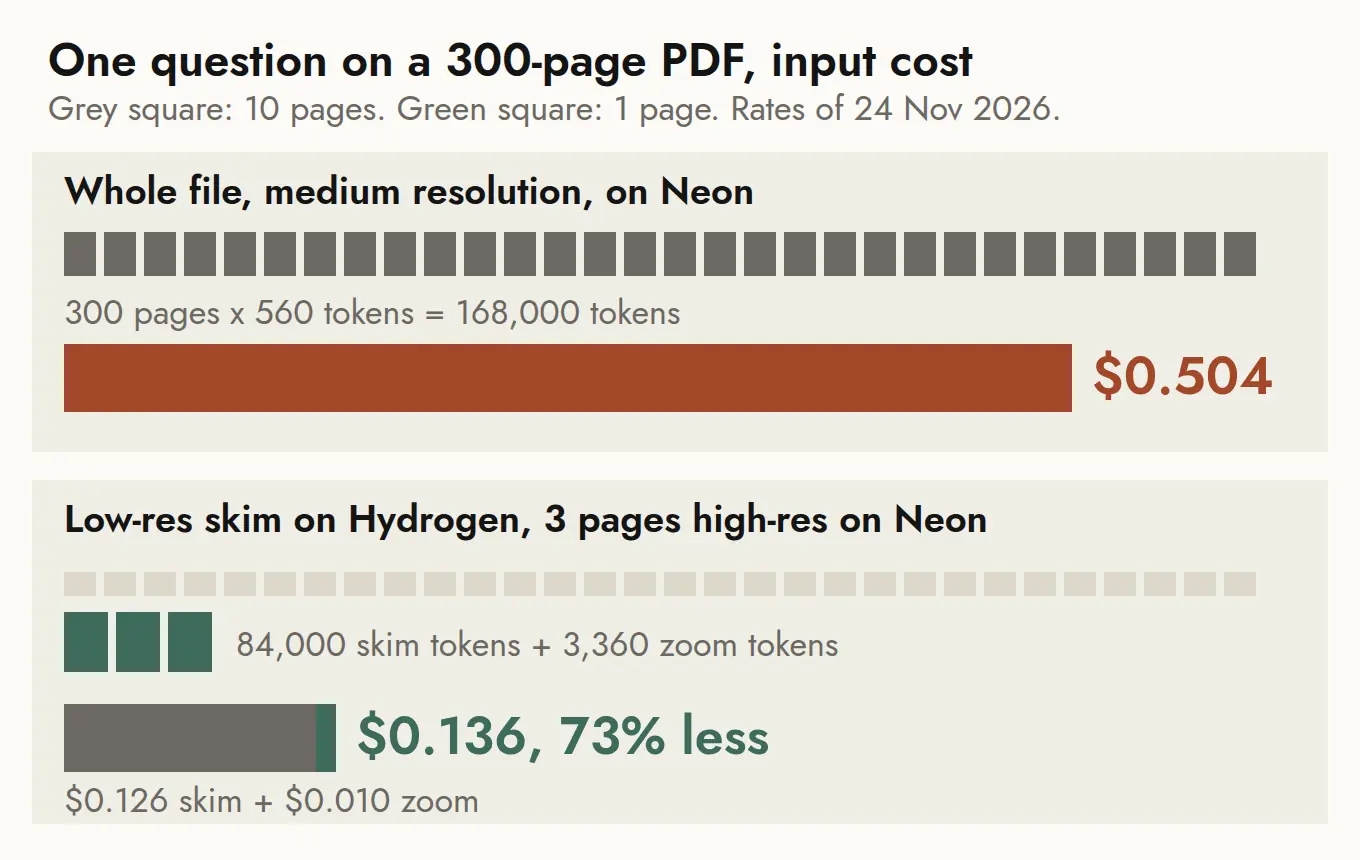
Skim all 300 pages at low resolution on Hydrogen to find the chart: 84,000 tokens, or $0.126. Then reuse the same file URI to send pages 3 to 5 at high resolution to Neon: 3,360 tokens, or about $0.010.
Whole report on Neon: $0.504. Skim on Hydrogen plus a three-page zoom on Neon: $0.136, or 73% less.
The saving grows with each follow-up question, because only the three zoomed pages need to travel again.
When the text layer costs more than the image
Google’s example skims with page_text, the extracted text, and that is not always the cheap option. Google’s own rule of thumb is about 4 characters per token, so a dense page of 3,000 characters comes to roughly 750 tokens of text, against 280 for a low-resolution image.
Skimming the same 300 dense pages as text on Hydrogen would cost about $0.34, close to three times the low-resolution skim. On slide decks with 400 characters a slide, the text layer wins easily, at roughly 100 tokens a page.
My rules for PDF-heavy pipelines
After running these numbers, this is how I would set up any Gemini 4 pipeline that reads long documents:
- Never leave the default on long files. Medium resolution on every page is the expensive habit slicing was built to end.
- Skim with low-res images on dense reports, and with page_text on slides and sparse layouts.
- Zoom at high resolution only on charts, tables and footnotes. At 1,120 tokens, a high-res page costs four low-res ones.
- Do the skim on Hydrogen, and keep Neon for the pages that need its reasoning.
- Move Carbon jobs before 1 December or price them at $4.00 input from that date.
Page images are only one input line on the invoice. My Gemini token cost breakdown covers the rest of Google’s grid, from caching rent to Batch.
Frequently asked questions
How many tokens is a PDF page in Gemini?
On Gemini 4 and Gemini 3 models, about 280 tokens at low resolution, 560 at medium, which is the default, and 1,120 at high. Gemini 2.5 models count a flat 258 tokens per page.
Does file slicing work on Gemini 3 or Gemini 2.5?
Google’s announcement says native file slicing works across all Gemini 4 models, and it names no older family. On Gemini 3 and 2.5, plan on splitting the file yourself before sending it.
Is the embedded text of a PDF billed on top of the page images?
Not in the default mode. Without processing options, Gemini extracts the PDF’s embedded text alongside the page images at no extra token charge. Once you request the page_text layer through slicing, that text is billed as input tokens.